Pay your bill by eCheck (ACH)
Paying your bill by electronic check (eCheck) is fast, easy, and free. To pay by eCheck you need two pieces of information: your checking or savings account number and your U.S. bank’s nine-digit routing number.
On a paper check, your bank’s routing and account number is found on the bottom of the check. Your bank's routing number always comes first and is exactly nine digits. Your account number may appear before or after the check number and can vary in length. Your account number is the number you use when you make a deposit into your account. Please include any leading zeros.
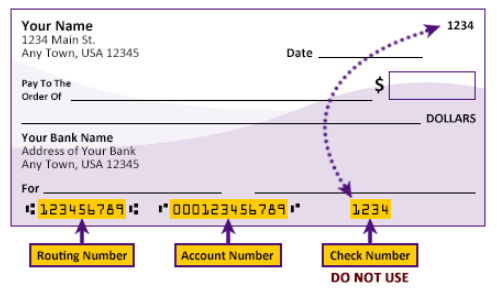
If you don’t have access to a paper check or you’re paying from a savings account, ask your bank for its nine-digit routing number. Often times, this information is also found in your banking institution's app.
How to pay by eCheck:
- Log into MyUSI. Within the student apps, select TouchNet. Authorized users should use the TouchNet Authorized User login.
- Click Make Payment. If you already have a saved payment method, you may select One Click Payment.
- You may pay by account balance or by term. By selecting the account balance, your payment will be posted to the current term. If you have a balance from a prior term or multiple terms, you should select to pay by term. Enter the amount of your payment.
- Select Electronic Check from the payment method drop down menu.
- Enter your bank account and billing information. You may save your payment method for future use or continue without saving.
- You will be presented with the ACH Payment Agreement. Please review the information for accuracy. If correct, check the terms and conditions box and Continue.


