


The Single Sign On Authenticator can limit only USI employees and students to participate in a survey/form and it can allow for fields such as first name, last name, USI email, and USI ID to be pre-populated within the form with certified correct data from Banner. This assists in making forms that need participants to fill in these fields easier to complete as well as verifying data with the university’s records. This will prohibit a survey from displaying if embedded onto a website. Post the link to the survey instead, to allow for USI employees and students to participate.
Setting up an SSO Authenticator in a Qualtrics survey/form
What fields can I bring into a Qualtrics survey/form for a students and employees of the university? (Capture respondent identifying info)
Use the table below to fill out an SSO Authenticator within a Qualtrics form. We are able to bring over these values ONLY if they are populated within employee/student contact information in Outlook.
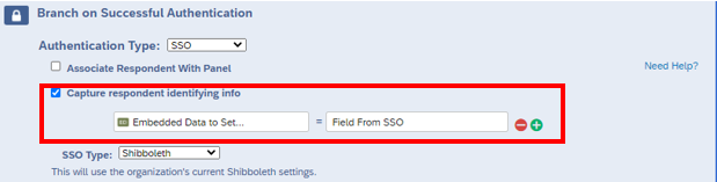
You must enter the Embedded Data to Set and Field from SSO EXACTLY as shown below for the fields that you want to populate. You are not required to enter all of the fields. Best practice for doing so is simply copy and pasting into the authenticator in your Qualtrics form from the table below.
|
Embedded Data to Set |
Field from SSO |
Who will it populate for? |
What does it populate? |
|---|---|---|---|
| First_Name | firstname | Everyone | The user's first name. |
| Last_Name | lastname | Everyone | The user's last name. |
| USI_ID | employeeID | Everyone |
Students - Their Eagles ID. Employees - Their USI ID. |
| USI_Email | Everyone |
*Students - Their (@eagles.usi.edu) email address. *Employees - Their (@usi.edu) email address. |
|
| USI_Office_Phone | phone | Employees only (not including student workers) | Employees on-campus office phone number. |
| USI_Department | department | Employees AND Student Workers |
**Student Workers ONLY - Their working department. Employees - Their working department. (ex: Planning, Research, & Assessment) |
| USI_Office_Location | officeLocation | Employees only (non including student workers) |
Employees on-campus office building and location number. (ex: Byron C Wright Admin Bldg 104K) |
| Primary_Degree_Major1 | primarydegreemajor1 | Students only |
Students' first major for their primary degree. (ex: RIBS, ENGL, ENGR) |
| Second_Degree_Major1 | seconddegreemajor1 | Students only |
Students' first major for their second degree. (ex: RIBS, ENGL, ENGR) |
| Third_Degree_Major1 | thirddegreemajor1 | Students only |
Students' first major for their third degree. (ex: RIBS, ENGL, ENGR) |
*If an alias is set up in Outlook for an email address, the alias will populate. For example - John Smith's email may be jsmith123@usi.edu, but if he has an alias active, it will return it as john.smith@usi.edu.
**If a student signs into the SSO with their student worker username (ends in "jasmith_se@usi.edu"), it will populate their working department.