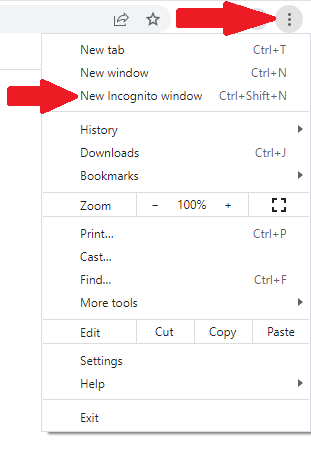
1. Open Chrome
2. On the top right-hand side of the window, click the button with 3 vertical dots. A drop down menu will appear
3. Click “New Incognito Window” (3rd from top)
4. In the new browser window, you can open your WEB based mail to read your email
1. Open Safari
2. Click File
3. Click "New Private Window" (2nd from the top)
4. In the new browser window, you can open your WEB based mail to read your email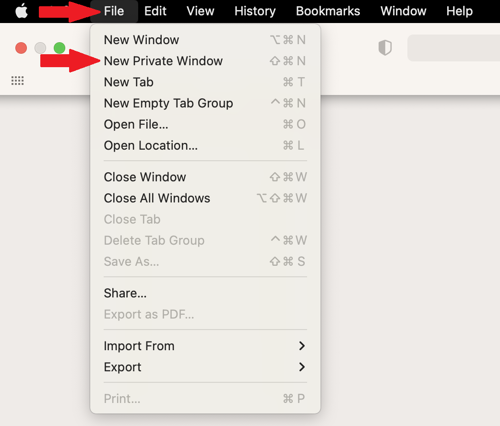
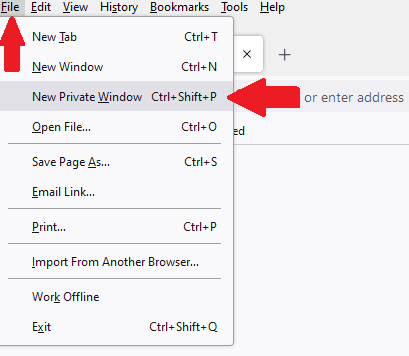
1. Open Firefox
2. Top Left hand-side, Click “File”
(If you don’t see “File,” press Alt to make the menu bar appear. Then click “File”)
3. Click “New Private Window” (3rd from top)
4. In the new browser window you can open your WEB based mail to read your email
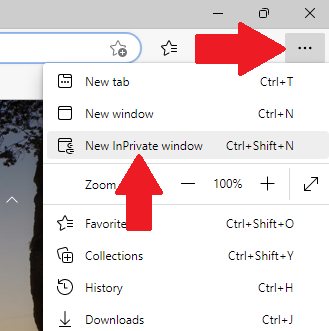
1. Open Microsoft Edge
2. On the top right-hand side of the window, click the button with 3 horizontal dots. A drop down menu will appear
3. Click “New InPrivate Window” (3rd from top)
4. In the new browser window, you can open your WEB based mail to read your email