Skip to content
USI campus to reopen, classes resume, January 28

Change is never easy, and we know this is a challenging time as you navigate recent announcements affecting programs and operations at Oakland City University. We want you to know that your educational journey doesn’t have to pause.

At the University of Southern Indiana, we are fully committed to helping you transition seamlessly so you can stay on track with your education journey. We’ve designed this dedicated page specifically for you to explore our programs, access resources, learn about credit transfers and continue your education with minimal interruption.

>> OCU Student Information

Last updated:

Uniprint

Steps for Using Uniprint

1. Upload the document

  • Go to https://print.usi.edu (https must be typed or the page will not load).
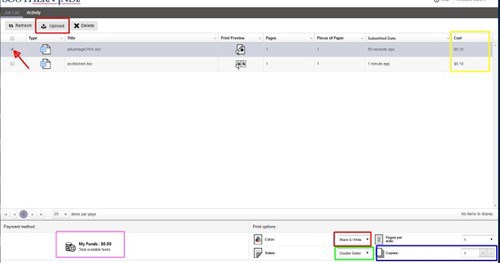
  • Log in with your myUSI credentials. This brings up My Print Center, your personal print queue.
  • Click the "Upload" button on the upper left side.
  • Browse to your document and choose it. You should see it in your queue. 
  • Select the checkbox to the left of your document
  • At bottom right choose B&W or color, front and back, number of copies. The printing cost will appear to right of document name.
  • Log Out of My Print Center (top right)
    * If you see an error screen, you may have to go to Advanced and click "proceed to website anyway". The site is safe, but there might be a certificate error. 

2. Print the document

  • Go to a Printer from this list (use the workstation near the printer)
  • Sign in to My Print Center with your myUSI username and password
  • Click the print button on the right side of the screen.
  • Pick up your printed paper(s) within 2 hours.