The benefit of using OneDrive, is that you create, edit, and share your documents from one central location. You can start a Word document on your handheld device, and save the file to OneDrive. You can then switch to your computer, open the same file, edit it, and save to OneDrive. Go into a computer lab, open the same file, edit, save, share.
Features: Web interface, sync app for Windows, Mac, iOS, and Android, integration with Microsoft 365, 1 TB storage, built in to Windows 11

A OneDrive license is available to students, faculty, and staff. When a user's role is alumni only, they will lose the OneDrive license and access to their OneDrive.
There are multiple ways to view files you have saved to OneDrive:
1. Login to Microsoft 365.
2. Click Apps.
3. Click OneDrvie.
4. You can now see all files that you have saved to OneDrive.
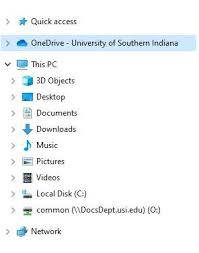
1. Open File Explorer.
2. On the left side of File Explorer, there should be a OneDrive folder. Click on it to view files saved in OneDrive.
On Windows, you can put your OneDrive on the system tray. To do this:
1. Go to the system tray in the bottom right hand corner of your computer (it's to the left of the time).
2. Look for a blue cloud icon.
3. If you do not see it click on the up arrow (^) icon and look for it there.
4. Click on the cloud icon to manage your OneDrive.
1. Download the Microsoft OneDrive app from the App Store or Google Play Store.
2. Log in with your USI email and password.
To learn more about OneDrive, click here for training.