Skip to content
USI campus to reopen, classes resume, January 28

Change is never easy, and we know this is a challenging time as you navigate recent announcements affecting programs and operations at Oakland City University. We want you to know that your educational journey doesn’t have to pause.

At the University of Southern Indiana, we are fully committed to helping you transition seamlessly so you can stay on track with your education journey. We’ve designed this dedicated page specifically for you to explore our programs, access resources, learn about credit transfers and continue your education with minimal interruption.

>> OCU Student Information

Last updated:

Vehicle Rentals

Travel Procurement

Error loading Partial View script (file: ~/Views/MacroPartials/CheckSessionLogin.cshtml)
  • Rentals within the U.S.: Book a vehicle using the Enterprise Res Portal to receive USI negotiated rates and insurance coverage
  • Non-local rentals: Book a vehicle using the Enterprise Res Portal, Egencia ($2 non-refundable fee applies), or another provider if the rate is significantly less
  • Renting a large van (12 or 15 passenger)? Call the Enterprise branch to book it
  • Renting a vehicle for one-way use? Call the Enterprise branch to confirm this is allowed for the vehicle reserved
  • Request exemption of Indiana sales tax when paying for a business rental using your Travel Card (USI’s tax-exempt number is embossed on the card)

Use the guide Making an Enterprise Rental Vehicle Reservations for trips that are:

  • Employee(s) only
  • Employee(s) with Students:
    • Single vehicle: non-local rentals
    • Multiple vehicles: local rentals

Use this guide Making Enterprise Rental Vehicle Reservations Using an Enterprise Billing Account for trips that are:

  • Student(s) only
  • Employee(s) with Students:
    • Multiple vehicles: non-local rentals

Steps involved to retrieve an Enterprise toll:

  • Use Google Chrome browser
  • Go to https://enterprise.tollpassgo.com/
  • Click Receipts & Statements
  • Enter renter's last name
  • Select Contract Number for search
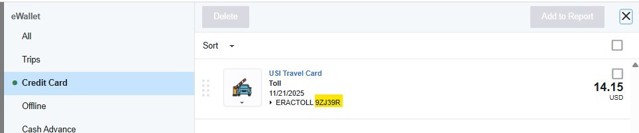
  • Enter contract number found in the credit card transaction in the Emburse eWallet (see pic below)

  • Click CAPTCHA box
  • Click VIEW TOLL STATEMENT
  • Click Statement ID # link to view the itemized TollPass Receipt
  • Click PRINT and save as a PDF for the trip Expense Report

Avis Web Portal

The discount code is D134100, which may be used for personal rentals

Budget Web Portal

The discount code is Z408900, which may be used for personal rentals

Enterprise Personal Rentals Web Portal

The discount code for Enterprise personal rentals is XZ58F82.

  • Enter it in the box labeled "Corporate Account Number", which will populate this verbiage "USI-PERSONAL USE ACCOUNT".

Authorized Driver

Check with Risk Management to see if you are required to become an Authorized Driver when you are driving on behalf of USI.

Connect With
Travel Procurement

(812) 465-1058